One self-contained binary. No .NET SDK, no Docker, no Python. Linux, macOS, and Windows on x64 and arm64. Re-run the installer to upgrade — it verifies the checksum and swaps the binary atomically.
The first run creates ~/.blazorly/settings.json and serves the chat UI at http://localhost:5080. Flags:
--port <n> — bind this port (default 5080)
--host <ip> — bind address (default localhost; 0.0.0.0 for all interfaces)
--token <secret> — pin the console access token (default: fresh random token each boot, printed in the startup URL)
--no-open — do not open a browser tab
Set a provider
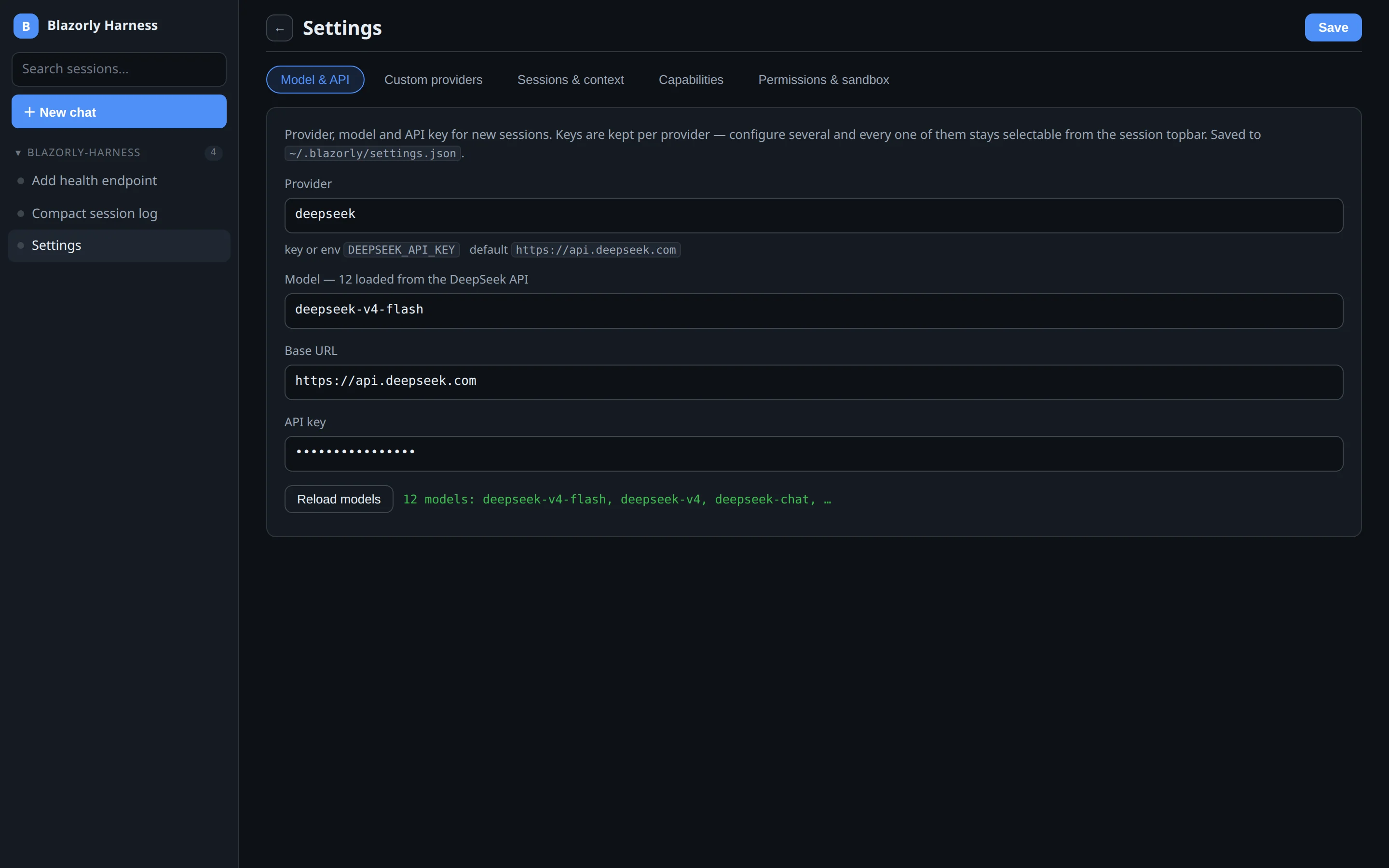
Open Settings from the sidebar. Stay on the Model & API tab, pick a provider, load models from that API, paste a key, Save. The other tabs (custom providers, sessions, capabilities, sandbox) are optional on day one — see Settings tabs.
First run: Model & API, then Save. You do not need the other four tabs yet.
Works with DeepSeek, OpenAI, Anthropic, xAI, Ollama, LM Studio, and any OpenAI-compatible endpoint. Extra routes live under Settings → Custom providers.
API keys resolve per request. Environment variables (DEEPSEEK_API_KEY, OPENAI_API_KEY, ANTHROPIC_API_KEY, XAI_API_KEY, GEMINI_API_KEY, …) take precedence if the settings field is empty. A provider’s key is never sent to another route.
Headless, from a repo
blazorly run "summarize this repo"
The invoking directory becomes the workspace. Useful flags: --workspace, --provider, --model, --resume, --timeout, --json, --quiet.
Exit codes: 0 completed, 2 error or blocked, 3 aborted or interrupted, 1 harness failure.
Essential settings
Setting
Default
What it does
provider / model
deepseek / deepseek-v4-flash
LLM route for new sessions
apiKey
—
Or the provider’s environment variable
sandboxMode
full-access
full-access, workspace-write, or read-only
contextWindowTokens
65536
Compaction and context-meter window
enableTeams
false until set
Teammate tools
enableSystemOne
false until set
Decision-model seams
disabledPlugins
[]
Turn off plugins you do not need, e.g. ["terminals","lsp"]
Build from source
Requires .NET SDK 10.0. Linux needs cc/gcc for the Landlock sandbox helper (compiled on first use).
git clone https://github.com/deepakkumar1984/blazorly-harness.git
cd blazorly-harness
dotnet build Blazorly.Harness.slnx
dotnet test
dotnet run --project src/Blazorly.Harness.Web
dotnet run --project src/Blazorly.Harness.Cli -- run "hello"
Upgrade and verify
blazorly update
blazorly --version
The installer also upgrades in place if you re-run it. Set BLAZORLY_INSTALL_BASE to a local dist/ folder to test unpublished builds. BLAZORLY_SKIP_VERIFY=1 skips the checksum gate — do not use that on a machine you care about.